Section Plane
The Iray Section Plane is a helper object for placing section cuts through an entire 3ds Max scene. This creates an infinite
planar cut in the Iray rendering, but is shown as a simple rectangular grid in the viewport with arbitrary size and spacing.
Multiple Section Planes can be combined to cut the scene in several places.
Adding a Section Plane
To add a Section Plane, from the dropdown on the Tool panel under Create > Helpers, select
Iray+. On the Object Type rollout, select Section Plane:
Parameters
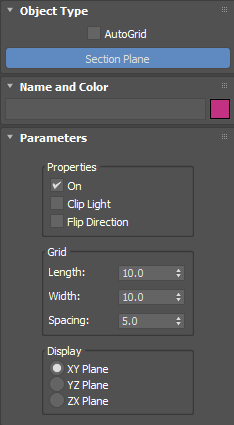
Properties:
- On: toggles the section cut in the rendered image. Disable this to show the full scene.
- Clip Light: when enabled, the part of the scene hidden by the section cut is made invisible to the camera,
but still occludes incoming light, i.e. the excluded geometry still casts shadows. Use this to see inside a model whilst
preserving the original scene lighting. When disabled, the excluded geometry is completely hidden by the section plane, i.e.
the hidden geometry does not occlude incoming light and has no effect on the scene lighting.
- Flip Direction: when enabled, this reverses which side of the Section Plane is hidden in the rendering.
Grid:
- Length: sets the length of the helper shown in the viewport.
- Width: sets the width of the helper shown in the viewport.
- Spacing: sets the size of the grid shown within the helper in the viewport.
Display:
- XY Plane/YZ Plane/ZX Plane: sets the initial orientation of the section cut.
✱ Note: standard 3ds Max transforms (move, rotate, scale) and animated
transforms are supported.
▲
Last edited:

 ➤
➤
 ➤
➤
 ➤
➤
