Iray+ Object Properties
Iray for 3ds Max uses additional Object Properties that can be found in the Iray+ Object Properties. To access these
additional properties, first select an object or objects. From the 3ds Max menu bar, select
Edit > Iray+ Object Properties…. Alternatively, right-click in the active viewport and
select Iray+ Object Properties… from the quad menu.
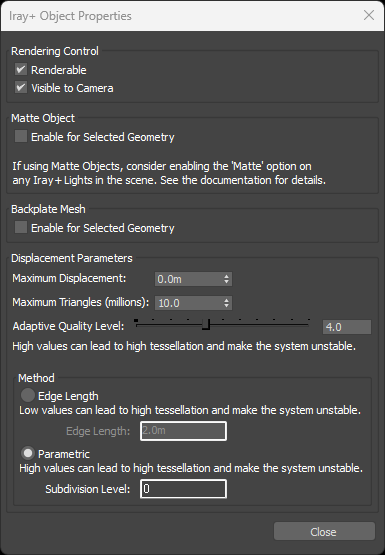
Rendering Control:
- Renderable: sets selected object(s) to appear or disappear from the rendered output.
✱ Note: when enabled, the object appears in the rendering. When disabled,
the object is not visible in the rendered output.
- Visible to Camera: sets selected object(s) to appear or disappear from the camera in the scene.
✱ Note: when enabled, the object appears in the rendering. When disabled,
the object is not visible to camera rays, and only affects secondary shadow and reflection rays in the scene.
Matte Object:
Backplate Mesh:
- Enable for Selected Geometry: when enabled, any render environment background is mapped onto the
selected object(s), creating a virtual 3D environment backplate which can produce parallax effects whilst navigating.
Backplate Mesh objects do not receive lighting or cast shadows or reflections in the scene.
Displacement Parameters:
- Maximum Displacement: sets the maximum amount of displacement.
✱ Note: surfaces will be offset by the displacement amount (positive
or negative) as specified in the assigned Iray+ Material up to the Maximum Displacement
amount. Values exceeding Maximum Displacement are capped at this distance.
- Maximum Triangles (millions): controls the maximum number of new triangles generated during a
displacement map subdivision.
✱ Note: exceeding this limit will reduce the subdivision level automatically.
- Adaptive Quality Level: controls the number of recursive subdivisions where displacement occurs.
✱ Note: you can use this control alone or in conjunction with either
Method (see below). Increasing the Adaptive Quality will perform additional
subdivision only where necessary rather than across the entire object.
✱ Note: high values can lead to high tessellation and make the system unstable.
- Method: specifies a subdivision method for the entire object.
- Edge Length: defines a topology-independent method for tessellating a polygon. This value defines the
smallest potential edge length produced by subdivision. Iray will stop subdividing an edge once it reaches this size.
✱ Note: low values can lead to high tessellation and make the system unstable.
- Parametric: defines a subdivision method whereby the object’s topology will be subdivided recursively to create
the displacement effect. Each subdivision potentially may divide a single face into four smaller faces.
✱ Note: high values can lead to high tessellation and make the system unstable.
✱ Note: applying either Method will increase tessellation for the entire
object, even where it is not necessary. We recommend using the Adaptive Quality control and only
applying these additional subdivision methods if you require greater detail.
▲
Last edited:
