
Documentation
Documentation
Iray for 3ds Max includes two renderers, Iray+ and Iray+ Interactive, each tailored to perform specific rendering tasks. This page provides details on how to control and optimize the behavior of each renderer to suit your requirements.
(For details on choosing your renderer, see here.)
The Iray+ renderer tab, which can be accessed by selecting Rendering > Render Setup… from the 3ds Max menu bar, provides controls to optimize rendering behavior and to specify Frame Completion criteria.
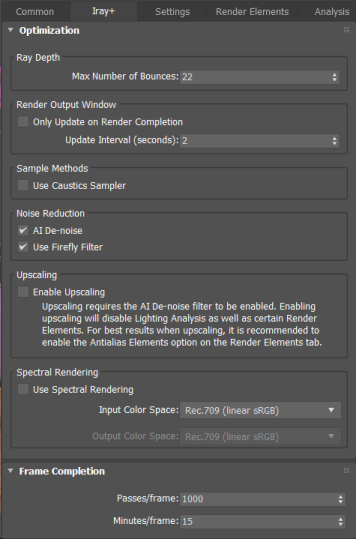
AI De-noising is a GPU-only filter, optimised for Pascal-generation (or later) GPUs. Maxwell and Kepler generation GPUs are supported, but overall render performance may be significantly impacted on these devices. The filter also requires significant memory resources to operate and therefore its performance may be limited on GPUs with insufficient available memory.
Rendering will stop at the first Frame Completion value reached (for example, if 1000 iterations have been completed before 15 minutes have elapsed).
The Iray+ Interactive renderer tab, which can be accessed by selecting Rendering > Render Setup… from the 3ds Max menu bar, provides controls to optimize rendering behavior and to specify Frame Completion criteria.
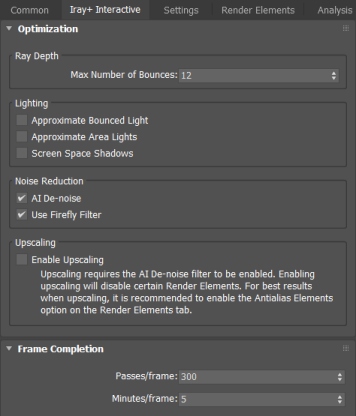
AI De-noising is a GPU-only filter, optimised for Pascal-generation (or later) GPUs. Maxwell and Kepler generation GPUs are supported, but overall render performance may be significantly impacted on these devices. The filter also requires significant memory resources to operate and therefore its performance may be limited on GPUs with insufficient available memory.
Rendering will stop at the first Frame Completion value reached (for example, if 300 iterations have been completed before 5 minutes have elapsed).
Last edited: