Iray for 3ds Max has built-in remote rendering. Two methods are supported: Network Render, which uses Iray Server for
offline rendering, and Remote Streaming, which uses a live remote connection to give fast direct images within 3ds Max.
Currently, NVIDIA’s Visual Computing Appliance
(VCA) is fully supported. Autodesk® Backburner™ also works but is not yet officially supported.
An introduction to Iray Server
Network Render
Network Render provides 'offline' rendering, enabling you to create rendering jobs to be submitted to
Iray Server. Once submitted, you can close
3ds Max or continue working on your project and download your finished renders from the server on completion. Iray Server
can be used to render on another machine that you may own, and is perfect for teams to share the rendering power of other
machines in the workplace.
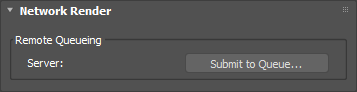
The Network Render rollout can be found on the Rendering > Render Setup… > Settings tab.
To launch the Queue Server click Submit to Queue… You can also launch directly from the 3ds Max
menu bar, via Iray > Submit Network Render…
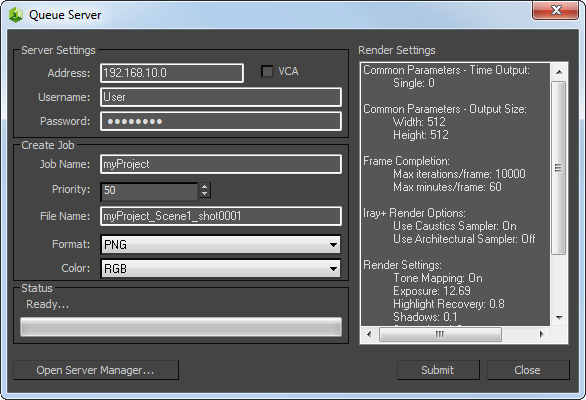
The Queue Server dialog provides Iray Server connection details and information on your pending rendering job.
Server Settings:
Address: the IP address of the Iray Server node.
VCA: if you are using an NVIDIA VCA, this will enable VCA-specific settings.
Username/Password: your authentication details.
Create Job:
Job Name: provides a title to Iray Server to identify your job.
Priority: sets the priority of your job on a scale of 0 – 100, where 0 is the highest priority and
100 is the lowest.
File Name: prepends each of your rendered frames with this name. This differs from the filename that
you may have chosen under Render Setup… > Common > Common Parameters > Render Output.
Format: Iray Server supports PNG, EXR, HDR, PSD, TIF and JPG formats.
This differs from what you may have set under Render Setup… > Common > Common Parameters > Render Output.
Color: choose between RGB or RGBA. (RGBA includes an alpha channel in each frame.)
Render Settings: provides details of compatible parameters that are applied to the pending job.
This includes parameters such as Time Output, Frame Completion, Output Size, etc.
Status: shows submission progress. Be aware that you will not be able to use the 3ds Max until either
the pending submission is complete or you have cancelled the job.
Open Server Manager: opens your web browser and launches Iray Server to let you see the progress of your
job and download the result once complete.
Close: cancels your job submission and closes the dialog.
✱ Note: Network Render only supports the
Iray+ renderer. Any jobs sent with the
Iray+ Interactive renderer targeting
Production Rendering Mode will revert to using the Iray+ renderer.
Network Render and Render Elements
When rendering remotely on Iray Server, post-processing normally applied by Iray+ on certain Render Elements
is not applied. This affects Elements such as Normal, ObjectID and MaterialID, as well as any Elements entirely dependent on post-processing.
✱ Note: Toon Render Elements cannot be rendered remotely, due to the above restrictions.
Network Render and Lighting Analysis
When performing Lighting Analysis via a Network Render,
the false-color mapping and range processing normally applied by Iray+ is not applied.
The rendered layers are returned in their raw, unprocessed form.
Illuminance: Illuminance data is returned as raw, unprocessed floating-point values
(in Lux or foot-candles, depending on your
Lighting Analysis settings). This applies to the
main Illuminance render, and also to the Direct Light and Indirect Light Additional Lighting Elements.
To preserve the full dynamic range of this data, use a high dynamic range file format such as EXR or
HDR. Other formats (such as PNG or JPG) clip the values and are
not recommended.
Luminance: Luminance data is returned as raw, unprocessed floating-point values
(in cd/m²). This applies to the main Luminance render, the Direct Light and Indirect Light Additional Lighting Elements, and
the standard Diffuse, Specular, Glossy and Emission Elements.
To preserve the full dynamic range of this data, use a high dynamic range file format such as EXR or
HDR. Other formats (such as PNG or JPG) clip the values and are
not recommended.
✱ Note: the Auto Range / Custom Range settings configured under
Lighting Analysis >
Color Mapping have no effect on Network Renders, as these control the local false-color display only.
Remote Streaming
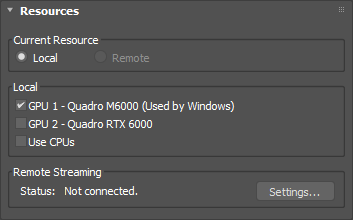
Remote Streaming lets you use a live, remote rendering connection directly from within 3ds Max. Remote Streaming can be
found under Rendering > Render Setup… > Settings > Resources.
Current Resource:
Local: uses rendering resources set in the Local group (see below). This will be selected by default
when you are not connected to a server. No remote resources will be used when this is selected.
Remote: uses remote resources set via the Streaming Server dialog (see below). This
will be selected automatically when you connect to a Remote Streaming server.
Local:
Iray works on CPU but is greatly improved by using NVIDIA CUDA GPUs. You can choose to allocate all or only some of
your GPUs to Iray.
Use CPUs: allocates your CPUs to Iray rendering. You may want to keep them free for smoother operation
of 3ds Max and other resource-intensive applications. If you do not have any GPUs available for Iray for 3ds Max, this
option will be disabled.
Use CUDA GPUs: gives choice over which GPUs are allocated to Iray rendering. GPUs used by Windows
are clearly indicated.
✱ Note: using CPUs and GPUs in combination may not provide a speed advantage
over using GPUs only. We recommend GPU-only rendering if you have older or less powerful CPUs.
Remote:
Remote status allows you to connect to remote rendering devices. To launch the Streaming Server, under Remote Streaming,
click Settings…
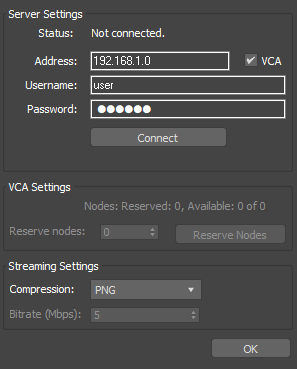
The Streaming Server dialog provides Iray Server connection details and additional settings to control VCA utilisation
and streaming performance.
Server Settings:
Status: the connection status of the remote streaming server.
Address: the IP address of the remote streaming server.
VCA: if you are using an NVIDIA VCA, this will enable VCA-specific settings.
Username/Password: your authentication details.
Connect/Disconnect: toggles connection to the remote streaming server on or off. This checks your
connection but (on a VCA) does not actually reserve nodes for usage until you also press the Reserve Nodes button.
VCA Settings:
Nodes: the number of Nodes available and the number of nodes that you have reserved.
Reserve Nodes: lets you reserve some or all rendering resources on the VCA.
✱ Note: we recommend that communication with VCAs uses the WebSocket Secure
(WSS) protocol. If you connect to a VCA with an IP address and you don't specify a protocol at the beginning
of the address, Iray for 3ds Max will assume use of the WSS protocol. You can also communicate with VCAs
using the WebSocket (WS) protocol. Example: 127.0.0.1 – This would
be interpreted as wss://127.0.0.1:8080 by Iray for 3ds Max. ws://127.0.0.1:8080/bridge – This would override the Iray for 3ds Max interpretation
of the address.
Streaming Settings:
These provide fine-grain control for image quality of remote streaming. This is useful for optimising workflows that use
the Iray+ Interactive renderer on remote servers, where speed of feedback may be prioritised over image quality.
Compression: gives choice over image compression types (Video, JPEG, PNG), or lossless (EXR).
Bitrate (Mbps): specifies the amount of information to be processed (Megabits per second) when Video
is selected as the compression format. The default is 5 Mbps.