An IBL (Image Based Lighting) instance in your scene gives you the use of HDRI type environments for scene lighting.
This can also be used as a background for your scene, or purely for lighting purposes.
An alternative is to use the built-in high dynamic range sun and sky system: Physical Sky.
To achieve realistic lighting results from a Spherical environment, it is important to ensure that the chosen HDRI or
IBL has a realistic dynamic range. For example, HDRIs of exteriors often do not show the sun as being sufficiently bright
compared to the rest of the image. The sun (unobscured by cloud) should be of the order of 100,000 times brighter than the
surrounding sky. If the sun is significantly fainter than this, the final image may be unrealistic. Typical results are an
overly blue tint to the scene (due to the relatively stronger contribution from the sky), soft shadows, and a general lack
of contrast.
Adding an IBL instance
To add an IBL instance to your scene, from the dropdown on the Tool panel under Create > Lights,
select Iray+. On the Object Type rollout, select IBL:
➤
➤
➤
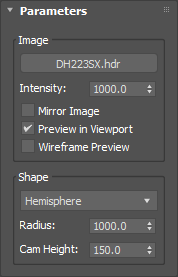
Parameters
Image:
Map: uses the selected HDRI file. (Says ‘None’ when empty.)
Intensity: determines the contribution of the selected HDRI to the scene lighting.
Mirror Image: flips the selected HDRI horizontally.
Preview in Viewport: shows the selected HDRI in the viewport.
Wireframe Preview: displays the viewport preview of the environment in wireframe form.
Shape:
Dropdown: choose different environment shapes:
Sphere
Hemisphere
Radius: sets the size of the environment.
Cam Height: moves the HDRI up or down within the environment.
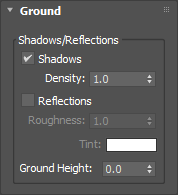
Ground
Shadows/Reflections:
Shadows: toggles shadow visibility on the ground plane of your environment on or off.
Density: controls the strength (darkness) of the shadow. The higher the value, the darker the shadow.
Reflections: toggles the display of reflections on the ground plane of your environment on or off.
Roughness: controls the strength of reflections in the ground plane. The range is from 0 to
10,000,000: a value of 0 gives diffuse reflections; a value 10,000,000 gives perfect mirror reflections;
values in between 0 and 10,000,000 give varying degrees of glossiness.
✱ Note: the
Iray+ Interactive
renderer does not display varying degrees of glossiness. In general, glossiness will not be displayed except
for Roughness values greater than 20,000, when a perfect mirror is used.
Tint: adds an optional color tint to the reflection.
Ground Height: defines where the ground plane is in your scene. Change this if the base of your model
is not sitting on the ground plane correctly.
✱ Note: Iray allows one IBL instance or
Physical Sky system to contribute to lighting at one time.
However, you can add and keep as many inside your scene as you require. To choose the active environment,
use the Active Environment option on the
Settings tab.

 ➤
➤
 ➤
➤
 ➤
➤