
Documentation
Documentation

A Canon EOS 5D Mk II DSLR camera rendered in Iray for 3ds Max
At a fundamental level, the natural world may be modelled as the interaction of energy and matter. This interaction can, in turn, be viewed by an observer through the visible appearance of the world.
In this model of the natural world, the appearance of an object is a consequence of the matter that constitutes it; in other words, appearance is an intrinsic quality of an object. However, to facilitate the mapping of intuitive categories of the natural world to a simulated world, a formal model can separate the appearance of an object from the object itself. Appearance is then an extrinsic category between the observer and the interaction of energy and matter. Defining appearance as an extrinsic property also has a very useful side effect: the separation of the look of an object and its geometric structure facilitates an experimental freedom fundamental to the role that rendering plays in design and visualization tasks.
Iray maps the conceptual categories of the natural world model — energy, matter, appearance, and observer — to categories suitable for describing a simulated world: light, geometry, material and camera.
There are three important points to note in this mapping:
The virtual camera specified in a scene defines attributes analogous to those that characterize a real-world mechanical camera, for example, viewing direction and focal length. However, unlike a physical camera, a virtual camera cannot create a record of a scene; that task falls to the renderer.
Strategies for creating a record of a rendering can differ between renderers. In ray tracing, for example, lines drawn from the camera's "eye" position into the scene determine the color values of the corresponding position in the resulting record. In other words, the camera determines the geometry of the relationship and the renderer controls how the color values are calculated. Control of the renderer is highly dependent on how the renderer is implemented in software. Developing an intuition for controls of the renderer requires an understanding of the rendering process itself.
▲Preceding sections described the input, process, and output that map to the phases of the rendering process:
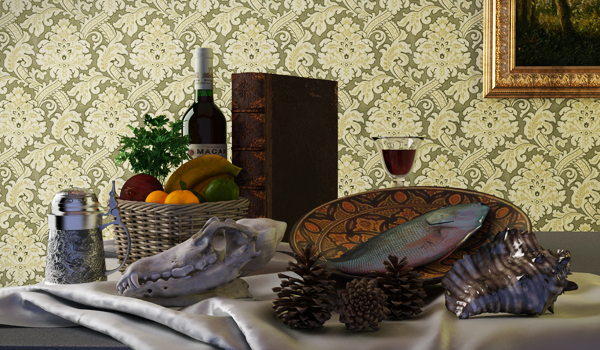
Still Life with Iray materials
Materials in Iray for 3ds Max are based on NVIDIA’s Material Definition Language (MDL), which comprises building blocks that can be combined in flexible ways. MDL is an open standard for describing materials and the interaction of light on their surface and volume. Iray materials simulate the entire lighting equation, and, by using measured data in your materials, will result in simulation-grade accuracy.
In Iray you are presented with a wide variety of materials, which form starting points that can be adapted to represent practically any material with accuracy. Materials can be shared with other MDL-enabled applications, thereby ensuring that all designers, developers, and others involved in a project will be working from one set of materials.
Iray+ material layers follow the real-world material creation structure, so the way you see them presented in Iray for 3ds Max follows how they would be manufactured or found in nature. A painted, varnished wood, for example, follows this structure:
A material is created with the core geometry at the bottom of the layer order, and additional layers built on top as required. Multiple layers of each type can be added in any order, allowing highly complex finishes, such as multi-layered paint peel and rust, chips and scratches.
The real-world approach to material creation allows efficient reuse and sharing of components between different materials. For example, you could take the Paint, Varnish and Decal layers from the Pine wood base and add them to a Plaster or Concrete Base. Immediately, you have created a new material from these building blocks without the arduous work of having to start from scratch.
The large library of materials already in Iray for 3ds Max makes creating even the most unique of materials straightforward. The open nature of MDL allows sharing between communities and between applications, removing much of the repetition usually involved.
▲Lighting in an Iray scene can come from three sources: global illumination from the environment, emissive materials, or artificial lights within the scene. A scene can be lit entirely by one of these sources, or by a combination of the three. These three broad categories can be further subdivided into more specific light source types. The environment lighting can come either directly from an IBL (image-based lighting), or from a procedural sun and sky simulation environment called Physical Sky. The artificial lights also come in various types, some of which are controlled by the usual 3ds Max light types, others unique to Iray for 3ds Max.
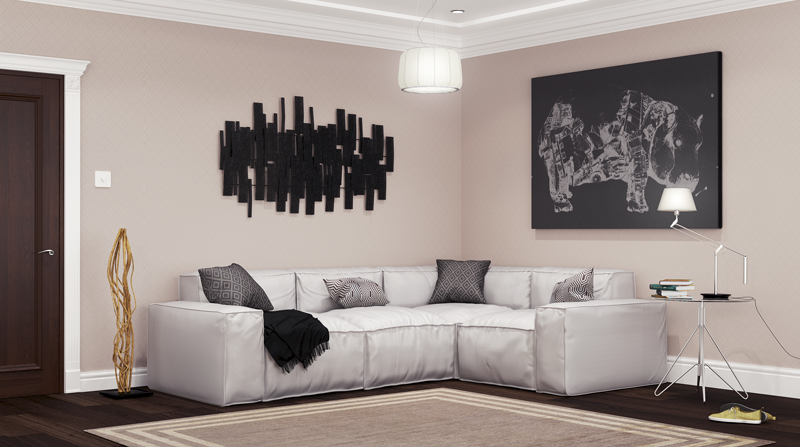
Interior scene lit with Iray lighting
The lighting systems in Iray for 3ds Max are all physically correct; if you put data from the real world into a model or simulation you will get accurate lighting out. This is perfect for studying light in simulation, and for creating realistic animation. The Physical Sky system is ideal for daylight studies and will give accurate luminance levels in any model.
As well as adding new Iray lights for powerful control over the look of your scenes, the plugin supports many of the existing 3ds Max lights, so your existing models will work as expected without needing to replace existing lighting; see the lighting compatibility table.
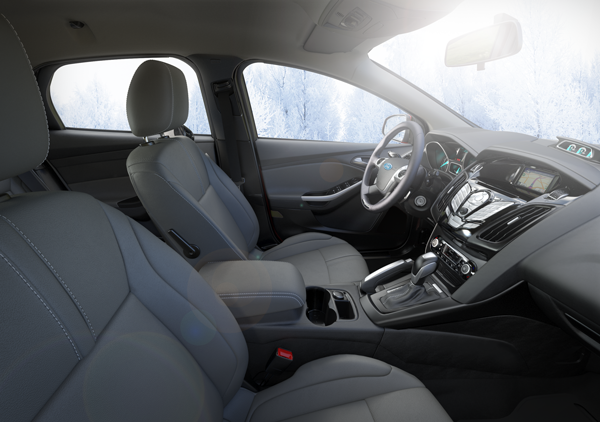
Vehicle interior lit with Environment Lighting
Iray uses the concept of environments to describe the world around the scene. These serve to provide the visible background to the image (in the absence of a backplate) and also to light the scene. The IBL environment can be specified either as a sphere or as a hemisphere, with additional parameters that allow you to control the dome size and various ground plane effects.
Iray also provides a powerful procedural environment called Physical Sky. This generates a physically realistic, high dynamic range sky dome around a scene. You can control many aspects of this dome including the overall intensity, as well as the sun's position and appearance in the sky (the sun position can be set either directly with an altitude-azimuth coordinate system, or by using the comprehensive date/time/location panel). As this is physically accurate, you will see realistic halo effects around the sun disk, haze in the atmosphere, sky color etc.
Iray has several types of artificial light which can be used to illuminate a scene partially or fully. As mentioned above, some of these light types are used in conjunction with the standard 3ds Max light types to integrate seamlessly into your existing workflow, while other light types are unique to the Iray plugin and are controlled separately.
The following light types are used when converting from the standard 3ds Max light types. No special controls are added for them in the plugin, but the most appropriate type will be selected automatically for the best conversion. See the lighting compatibility table for more details.
Distant
A Distant light acts as a point light placed infinitely far from the scene. The illumination is parallel and uniform i.e. each point in the scene "sees" the light in the same direction, and at the same intensity. In essence it mimics simple sunlight.
Point
A Point light give a uniform light distribution from a single point within the scene. The illumination at any point in the scene depends on the direction to the light position as seen from that point, and is also proportional to the inverse square of the distance between that point and the light position. This light source is not visible in the scene.
Spot
A Spot light is similar to a point light, but the light distribution is not spherically uniform. Instead it is directed into a "cone", to mimic the appearance of a real spot light. This light source is not visible in the scene.
Photometric
A Photometric light is similar to a Point or Spot light, but rather than exhibiting a uniform distribution, or a simple cone, this light source type reads in an external (IES) file which describes a more complex light distribution. This distribution can be oriented in the same way as that of a Spot light, but the actual shape of the distribution is fixed by the IES file. This light source is not visible in the scene.
Area
Area lights are unique to the Iray for 3ds Max plugin and therefore have their own controls and user interface. See the Iray+ Lights page for details.
An Area light defines a simple piece of geometry (rectangle, disc, sphere, or cylinder) that emits light. Unlike the other types of artificial light, by default these light sources are visible in the scene, so they are useful for modelling simple bulbs, strip lights, and the like. They can also be made invisible to the camera like all the other light types. Each type of Area light has parameters that allow you to control it's position, size, shape, and orientation. By default, an Area light will emit a basic uniform illumination; however, it is also possible to attach an IES file as with a Photometric light. In this case, every point on the surface of the Area light will act as a point source with this profile, and the total illumination is given by an integration over the surface.
▲Iray has different renderers tailored for performing specific rendering tasks. Iray+ is a production-level renderer with full global illumination support. Iray+ Interactive allows rapid interaction with, and modification of your scene. Both renderers share a common representation of your 3ds Max scene and materials, to ensure consistency of appearance. If you use other Iray-enabled software elsewhere, this consistency extends across your entire workflow. For more details, see the rendering overview.
▲Iray is designed to take full advantage of your GPUs, offering massive performance enhancements when you add additional hardware. This makes it an extremely efficient choice for using distributed rendering in your workflow. Cluster or Render Farms are supported out-of-the-box using the 3ds Max batch rendering tool, or other add-ons, such as Backburner. Cloud rendering support comes as standard and is simple to set up.
▲Next: Getting Started
Last edited: