Filters
The Filters rollout, accessible from the Rendering > Render Setup… > Settings
tab, enables you to add bloom and glare effects to rendered images and to control Iray’s anti-aliasing mode.
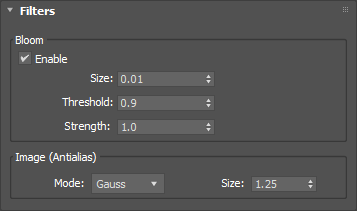
- Bloom: use this post-process filter to approximate bloom/glare effects. This can be used to produce
subtle enhancements, such as adding slight halos to emissive objects.
- Enable: toggles the Bloom filter on or off.
- Image (Antialias): use this filter to smooth out the effects of aliasing, to help reduce the
appearance of jagged lines in the image.
- Mode: selects between three different smoothing filter shapes:
- Size: specifies the size of the filter in pixels. A large value will reduce aliasing further but
may lead to unsharp images. The minimum setting is 0.5.
▲
See Also:
Last edited:
