
Documentation
Documentation
LPEs can be used to isolate specific scene objects, or groups of scene objects, and render them into separate images. These images can then be edited separately and composited in an image editing program. This can be useful for quickly altering the color or look of a specific material, or for showing multiple combinations of different materials on different objects within a scene, without having to render each combination or variation individually. In this article we will look at how to use the LPE grammar to achieve this.
We will use the same simple scene that we used in the Isolating Specific Light Sources article:
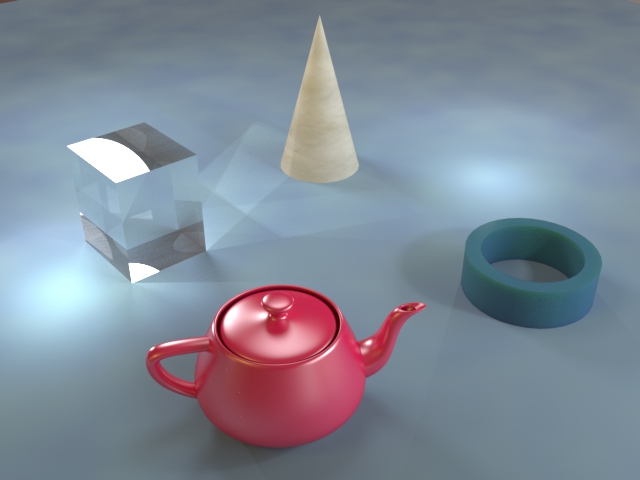
We can reference an individual object within an LPE by its handle, which is the same as the name of the object in 3ds Max. The four main objects in this scene have been named Cube, Cone, Teapot and Tube.
The simplest use case is to isolate a single object into its own layer and to capture the rest of the scene in another layer. These LPEs are simple to construct, especially as we are not interested in isolating specific lights and can just use the L operator to capture all light sources together. To capture just the teapot, use the following LPE:
L .* 'Teapot' E
This will capture rays that start at any light source in the scene, have any number (including zero) of arbitrary interactions with any scene elements, before hitting the teapot and then bouncing directly to the eye (camera). Note that the arbitrary interactions include any additional interactions with the teapot itself. So any interreflections between different parts of the teapot, or between the teapot and other objects, will be captured by this LPE, as long as the final bounce is between the teapot and the eye.
Light transport paths can be considered to travel in either direction, therefore LPEs are reversible. For consistency, this guide will express all LPEs as beginning on light sources and ending at the eye, but this is one case where expressing the LPE in the reverse order may make it more intuitive to understand:
E 'Teapot' .* L
Written in reverse, it is clear that we are capturing all camera rays which hit the teapot directly, regardless of what they then go on to do in the scene (provided they terminate on a light source of course). This LPE, expressed either way, will produce the following image:
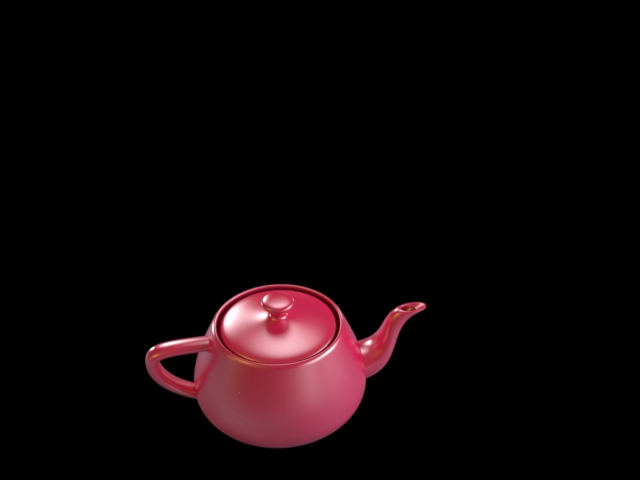
We also require an image that contains everything but the teapot so that the two can be composited together to create a final image. We can generate this layer via the following LPE:
L .* [^'Teapot'] E | L E
This is very similar to the previous LPE, but will instead capture the rays which bounce from any element other than the teapot into the camera. We achieve this by replacing the element that refers to interaction with the teapot ('Teapot') with its negation ([^'Teapot']). Something to note is that using the negation alone would require an interaction with some object other than the teapot directly before the eye event. For completeness, we also want to capture any rays that travel directly from a light source to the camera. The addition of the "| L E" term solves this. In this specific example there are no light sources directly visible to the camera so this term can be omitted, but in general this should be remembered.
We can also negate the entire previous LPE to give the same results:
^(L .* 'Teapot' E)
Either LPE will produce the following image:
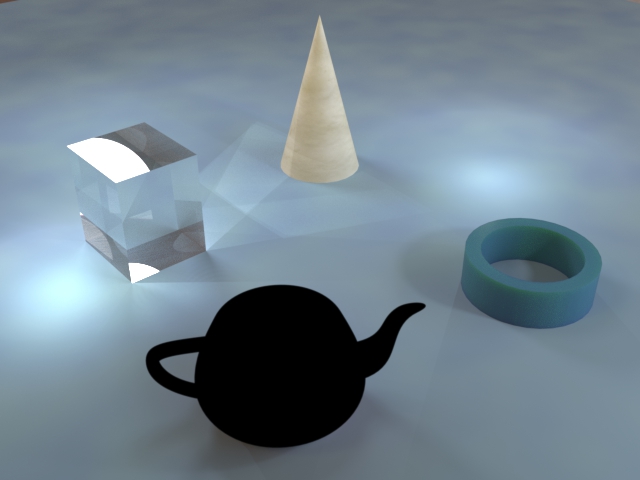
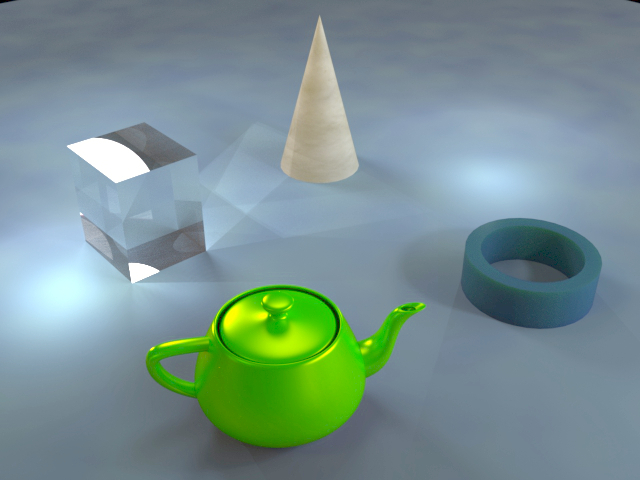
If the two layers are composited together at this stage then the final image will look just like the original image. However, the benefit of separating the teapot out into its own layer means being able to edit the look of the teapot separately to the rest of the scene. For example, it can be recolored quickly and easily:
It is possible to isolate more than one scene object in a single layer. This can be achieved using the "or" operator (|). The following LPE will isolate the cone and the tube:
L .* ('Cone' | 'Tube') E
This will capture any light rays which bounce directly from the cone or the tube into the camera (or eye rays which hit either object directly if you prefer) and will therefore result in an image that shows both objects:
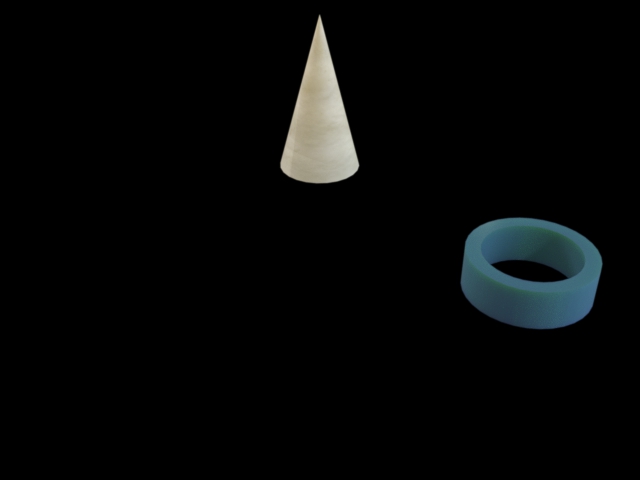
You can group together an arbitrary number of objects into a single layer simply by adding more "or" events within the brackets.
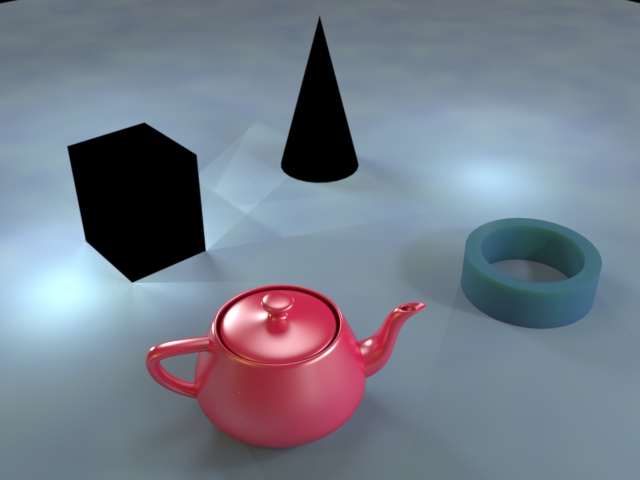
To create an LPE that will show everything apart from two or more scene objects, you can again negate the whole LPE that isolates just those objects. Alternatively, you can construct an LPE using the "and" operator (&). For example, the following LPE will capture everything but the cube and the cone:
L .* ([^'Cube'] & [^'Cone']) E
You cannot use the "or" operator here as this would capture all rays and give the full, unfiltered beauty render. This is because camera rays which first hit the cube would satisfy the "not cone" criterion, and camera rays which first hit the cone would satisfy the "not cube" criterion. By using the "and" operator, only rays which do not hit the cube and do not hit the cone are captured. Note again that, for this LPE to be exactly equivalent to negating the LPE that isolates the two objects, we should add the "| L E" term at the end, but (as discussed above) we can omit this term for our lighting scenario. The above LPE will give the following image:
It is possible to use emissive geometry as a light source when constructing an LPE, but care must be taken to construct the LPE correctly. For example, if the teapot in the above scene were emissive, you might expect the following LPE to capture all the light paths that originate from it:
'Teapot' .* E
However, if you try to set this LPE it will be rejected as invalid. The problem is LPE grammar explicitly enforces the requirement (as stated in the LPE Basics section) that each light transport path must begin at a light source and end at the eye. To get this LPE to work you must use the same grammar as when referencing any other light source by its handle, as described here. Therefore, the following LPE is the correct one to use in this instance:
<L'Teapot'> .* E
▲To continue learning about LPE construction, see the article on Filtering for Specific Events.
Last edited: