Scene Conversion
Iray for 3ds Max provides tools to convert your existing mental ray® or Autodesk scenes into Iray. You can convert
all Lights, Materials and Environments, or any combination of the three. You can even convert individual scene objects.
✱ Note: only Autodesk or mental ray® scenes are currently supported.
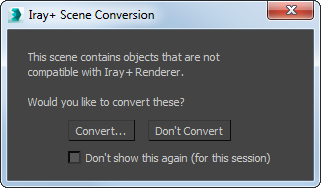
When you switch your renderer to Iray+
or Iray+ Interactive you will be given the opportunity to convert any non-Iray+ materials or lighting
in your scene.
Converting multiple objects
To launch the Iray+ Scene Converter, from the 3ds Max menu bar select Iray > Iray+ Scene Converter.
Alternatively, right-click in the active viewport and select Iray+ Scene Converter… from the quad menu:
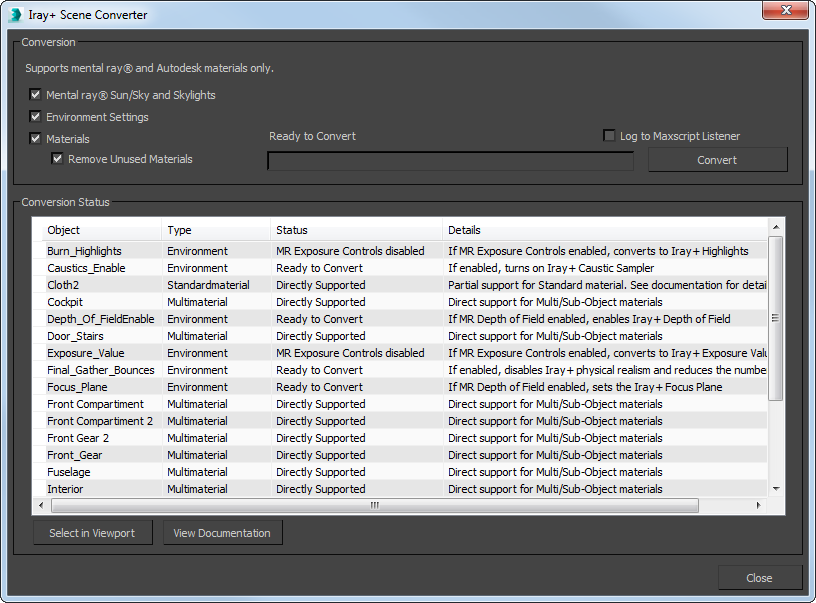
Conversion:
- Mental ray® Sun/Sky and Skylights: converts lighting, including mental ray® Sun and Sky (Daylight)
to Iray+ Physical Sky.
Any Incompatible lights will not be converted.
If you want the X, Y, and Z position of the mental ray® Sun to be converted with the scene, you will need to set it up
using the 'Date, Time, and Location' controls within the Modify panel. Positioning the mental ray®
Sun manually will mean that its X, Y, and Z positions are not converted.
✱ Note: when converting a mental ray® Sun/Sky, the Sky object will
remain in the scene after conversion. This will be ignored by the Iray+ renderer. The Iray+ Physical Sky
system created in the conversion contains both sun and sky effects.
- Environment Settings: recreates environments as Iray+ IBL environments and matches settings.
- Materials: recreates materials with Iray+ materials taking across any maps at the correct scale.
- Remove Unused Materials: removes all mental ray® materials from your material library after
completing a conversion, and replaces them with the Iray+ materials. Leaving this unticked will result in the
material library displaying both the mental ray® and Iray+ materials together.
- Log to Maxscript Listener: sends completed conversion details to the MaxScript Listener window,
where more details can be read.
- Convert: starts the conversion process. You will be given the opportunity to save your file, as
the conversion can not be undone.
Conversion Status:
- Lists objects in your scene as well as their type. Each column is sortable. Other columns include:
- Status: indicates conversion status. Items that won't be converted will display Directly Supported
by Iray or Not Supported, etc. Before conversion, compatible items will have the status Ready to Convert;
after conversion, their status will be Converted.
- Details: provides advice and details about the conversion status.
- Select in Viewport: objects selected under Conversion Status are also selected in
the viewport. This is useful for quickly creating selection sets, deleting or taking other actions on multiple items.
- View Documentation: displays this page in your default browser.
✱ Note: after converting a scene you may need to adjust the scene's
Exposure Value in Settings > Tone Mapper because your scene may
appear overexposed.
Compatibility with scene conversion
Materials
| Type |
Supported |
Details |
| mental ray® Arch & Design | ✔ |
Converted to Iray+ Arch&Design |
| mental ray® CarPaint | ✔ |
Converted to Iray+ Metallic Paint |
| mental ray® Subsurface Scattering Fast | ✔ |
Converted to Iray+ Fast SSS |
| mental ray® Subsurface Scattering Fast Skin |
✔ | Converted to Iray+ Skin |
| Autodesk Materials | ✔ |
|
| Standard Materials |
✔ |
Basic Parameters supported natively; unsupported maps will not work |
| Multi/sub-object |
✔ |
Nested Multi/sub-object materials are not supported |
| Autodesk Pro Materials |
✖ |
|
| Blend |
✖ |
|
| Matte/Shadow |
✖ |
|
| Top/Bottom |
✖ |
|
| Shell |
✖ |
|
| Composite |
✖ |
|
Maps
The commonly used maps are listed below. Assume that any map not listed is not supported.
| Type |
Supported |
Details |
| Dent Map |
✔ |
|
| Noise Map |
✔ |
|
| Autodesk Bitmap |
✔ |
Converted to a Standard Map |
| Autodesk Cutout |
✔ |
|
| Bitmap |
✔ | Converted on-the-fly to an Iray bitmap |
| Cellular |
✔ |
Baked and converted on-the-fly |
| Gradient |
✔ |
Baked and converted on-the-fly |
| Marble |
✔ |
Converted on-the-fly |
| Normal Bump |
✔ |
Converted on-the-fly to an Iray bitmap |
| Perlin Marble |
✔ |
Baked and converted on-the-fly |
| Composite |
✖ |
|
| Color Correction |
✖ |
|
| Falloff |
✖ |
|
| RGB Multiply |
✖ |
|
| RGB Tint |
✖ |
|
| Smoke |
✖ |
|
| Splat |
✖ |
|
| Swirl |
✖ |
|
| Tiles |
✖ |
|
| Waves |
✖ |
|
Lights
| Type |
Supported |
Details |
| mental ray® Sun/Sky |
✔ | Not supported if sun position was set manually |
| Skylight |
✔ | Converted to an IBL environment |
| mental ray® Area Omni |
✖ |
|
| mental ray® Area Spot |
✖ |
|
| mental ray® Sky Portal |
✖ |
|
| Target Spot |
✔ |
Converted on-the-fly |
| Target Direct |
✔ |
Converted on-the-fly |
| Omni |
✔ |
Converted on-the-fly |
| Free Spot |
✔ |
Converted on-the-fly |
| Free Direct |
✔ |
Converted on-the-fly |
| Target Light |
✔ |
Converted on-the-fly |
| Free Light |
✔ |
Converted on-the-fly |
▲
See Also:
Last edited:

