Camera Settings
The Camera rollout, accessible from the Rendering > Render Setup… > Settings
tab, provides a dropdown list of traditional (Planar) cameras, 360˚ panoramic (Spherical) cameras,
and other panoramic cameras (Cylindrical). When enabled, there are additional output controls for left eye
and right eye stereo rendering. (Default settings have no effect on the Iray rendering output.)
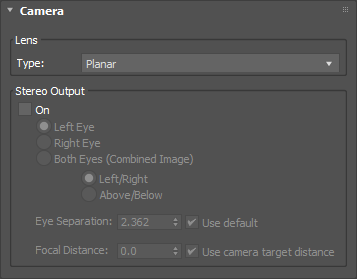
- Lens:
- Type: selects the lens type:
- Planar: select this (default) lens type to make the rendering unchanged from previous versions of Iray.
- Spherical: select this lens type to capture 180˚ vertically (zenith to nadir) and a full 360˚
horizontally, ignoring the viewport camera Field of View (FOV) settings. The resulting image is a latitude/longitude
spherical rendering.
✱ Note: this can be used to create spherical environments for Image Based
Lighting (IBL). For best results, try rendering square pixels at a 2:1 ratio (for example: 1024 x 512,
4096 x 2048).
- Cylindrical: select this lens type to create a cylindrical panoramic image. It uses the vertical FOV
of the viewport camera while the horizontal FOV becomes a full 360˚. This is similar to photographing and seamlessly
stitching together a series of consecutive images while rotating the camera horizontally around its panoramic pivot point.
✱ Note: for best results with Spherical and
Cylindrical lens types, use a camera parallel to the ground, with no pitch or roll.
- Stereo Output:
- On: toggles Stereo Output on or off.
- Left Eye: select to render with stereo offset based on Eye Separation and
Focal Distance.
- Right Eye: select to render with stereo offset based on Eye Separation and
Focal Distance.
- Both Eyes (Combined Image): select to render both left and right eyes with stereo offset based
on Eye Separation and Focal Distance:
- Left/Right: select to render both eyes simultaneously, side by side.
- Above/Below: select to render both eyes simultaneously, above and below.
✱ Note: when using Both Eyes (Combined Image),
it is necessary to set the entire 3ds Max Output Size. For best results when setting
up for Virtual Reality (VR)-ready output, use Above/Below, and try rendering square
pixels at a 1:1 ratio (for example: 1024 x 1024, 4096 x 4096).
- Eye Separation: sets the distance between the left and right eyes. Also known as inter-axial
separation, this defaults to 6 cm (2.362 inches). Disable the Use default checkbox to modify this value.
✱ Note: the Eye Separation value has an effect on the
perception of stereo depth. Larger values increase stereo parallax and make the scene scale feel smaller
and the stereo effect more noticeable. Conversely, smaller values make the perceived scene scale larger
and the stereo effect more subtle. VR device manufacturers may specify the recommended
Eye Separation distance for their products.
- Focal Distance: sets the distance at which the stereo effect has zero parallax. Objects closer than
this distance have positive parallax and appear to be projecting out of the screen. Objects beyond this distance
have negative parallax and appear to recede into the screen. Disable the Use camera target distance
checkbox to modify this value.
- Use camera target distance: enabled by default. When enabled, Focal Distance will
be the target distance of the viewport camera.
▲
See Also:
Last edited:
