
Documentation
Documentation
Iray for 3ds Max provides a number of methods for creating and using materials. Material Libraries are provided as a convenient means by which to access and add real-world materials to your designs.
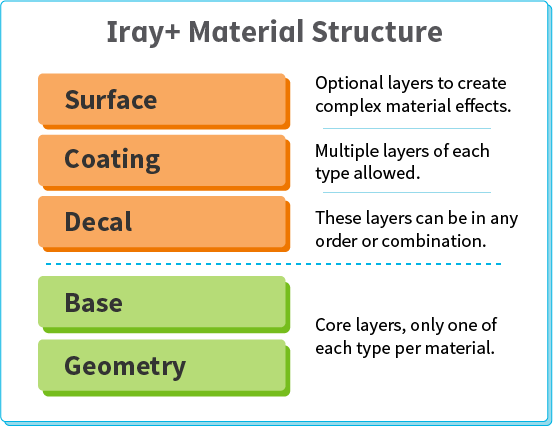
Another approach utilises material components, supported via the Iray+ Material. This offers a more generalised starting point based on practical High-Level material archetypes such as Metal, Plastic, and Glass. You can work these High-Level components into your own complex materials based on our Material Structure layer concept. When you construct a material, start with one or more High-Level components, then adjust their parameters to suit your needs.
All High-Level components are based on Low-Level components, which in turn underpin every material in Iray. A Low-Level component describes the fundamental physical properties of a material and the effects of light upon it.
Low-Level components are designed for flexibility. A single Low-Level component may be used to create various different High-Level components. In effect, each High-Level component is an instance of a Low-Level component with a particular set of parameter values.
This section describes Iray+ material structure in terms of High-Level components. It lists the various types of High-Level component available in Iray for 3ds Max and provides links to more details on their underlying Low-Level components.
At its simplest, an Iray+ Material must contain a Geometry layer and a Base layer. Optionally, you can add Decal, Surface, and Coating layers on top of these, in any order, to build up complexity.
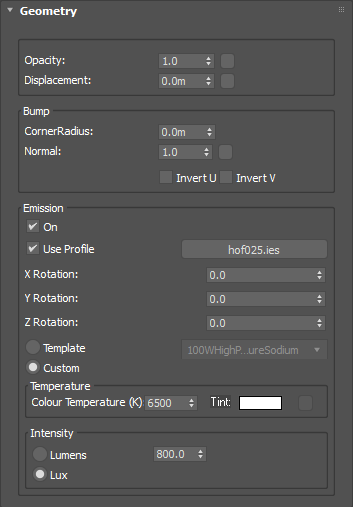
Geometry refers to the underlying structure of every material. At this level, some fundamental characteristics of your material can be defined:
The Base layer is the core component from which to create a realistic material as you define its essential form (wood, metal, plastic, etc.).
The material examples available in the Base layer presets dropdown in the 3ds Max Material Editor provide starting points for most materials.
| High-Level Component |
Low-Level Component used |
Link to Component |
|---|---|---|
| CarbonFibre | AnisotropicDielectric | Details ▶ |
| CeramicTiles | Dielectric | Details ▶ |
| CeramicWhiteware | TwoLobeDielectric | Details ▶ |
| Clay | TwoLobeDielectric | Details ▶ |
| Cloth | Diffuse | Details ▶ |
| CloudyGem | SubsurfaceScattering | Details ▶ |
| ConcretePolished | Dielectric | Details ▶ |
| ConcreteRough | Dielectric | Details ▶ |
| Diamond | PhysicalTransparent | Details ▶ |
| Gel | PearlescentSSS | Details ▶ |
| Glass | PhysicalTransparent | Details ▶ |
| GlassDispersion | PhysicalTransparent | Details ▶ |
| GlassFrosted | PhysicalTranslucent | Details ▶ |
| GlassThin | ThinwallTransparent | Details ▶ |
| Glossy | Dielectric | Details ▶ |
| Lampshade | DiffuseTransmission | Details ▶ |
| Leather | TwoLobeDielectric | Details ▶ |
| Masonry | Dielectric | Details ▶ |
| Matte | Diffuse | Details ▶ |
| Metal | Conductor | Details ▶ |
| MetalBrushed | AnisotropicConductor | Details ▶ |
| MetalPolished | AnisotropicConductor | Details ▶ |
| MetalSatin | AnisotropicConductor | Details ▶ |
| Mirror | SpecularReflection | Details ▶ |
| Paper | Diffuse | Details ▶ |
| PaperTranslucent | DiffuseTransmission | Details ▶ |
| Plaster | Diffuse | Details ▶ |
| PlasticOpaque | TwoLobeDielectric | Details ▶ |
| PlasticTranslucent(FastSSS) | DiffuseSSS | Details ▶ |
| PlasticTranslucent(SSS) | SubsurfaceScattering | Details ▶ |
| PlasticTransparent | PhysicalTranslucent | Details ▶ |
| Rubber | Dielectric | Details ▶ |
| Satin | WovenAnisotropic | Details ▶ |
| Skin | MultiLayeredSSS | Details ▶ |
| Stone | Diffuse | Details ▶ |
| StonePolished | Dielectric | Details ▶ |
| Suede | Backscattering | Details ▶ |
| Velvet | Backscattering | Details ▶ |
| Water | PhysicalTransparent | Details ▶ |
| Wax(SSS) | SubsurfaceScattering | Details ▶ |
| Wood | Dielectric | Details ▶ |
| WoodGrain | FibreAnisotropic | Details ▶ |
| WoodVarnished | Dielectric | Details ▶ |
A Decal is a sticker or an image that can be applied at any level within the material hierarchy.
| High-Level Component |
Low-Level Component used |
Link to Component |
|---|---|---|
| BrushedMetalFoil | AnisotropicConductor | Details ▶ |
| BrushedPlastic | AnisotropicDielectric | Details ▶ |
| Matte | Diffuse | Details ▶ |
| MetalFoil | Conductor | Details ▶ |
| Mirror | SpecularReflection | Details ▶ |
| Satin | Gloss | Details ▶ |
An Iray+ Material may have any number of Coating layers, representing finishes such as glaze, paint, or varnish.
| High-Level Component |
Low-Level Component used |
Link to Component |
|---|---|---|
| Anodized | Conductor | Details ▶ |
| CeramicGlaze | Dielectric | Details ▶ |
| ClearCoat | Dielectric | Details ▶ |
| Flakes | GlossFlakes | Details ▶ |
| FlipFlopPaint | FlipFlop | Details ▶ |
| Galvanised | GlossFlakes | Details ▶ |
| GlossFinish | Gloss | Details ▶ |
| GlossVarnish | Dielectric | Details ▶ |
| HammerPaint | AnisotropicDielectric | Details ▶ |
| MatteFinish | Diffuse | Details ▶ |
| MatteVarnish | Dielectric | Details ▶ |
| MetalPlating | Conductor | Details ▶ |
| PaintEggshell | AnisotropicDielectric | Details ▶ |
| PaintGloss | AnisotropicDielectric | Details ▶ |
| PaintMatte | AnisotropicDielectric | Details ▶ |
| PaintPearl | AnisotropicDielectric | Details ▶ |
| PlasticCoating | AnisotropicDielectric | Details ▶ |
| PowderCoating | AnisotropicDielectric | Details ▶ |
| ThinFilm | InterferencePattern | Details ▶ |
A Surface layer can be used to represent dirt, rust, scratches, and other imperfections found in the real world.
| High-Level Component |
Low-Level Component used |
Link to Component |
|---|---|---|
| DeepScratches | Diffuse | Details ▶ |
| Dirt1 | DiffuseTransmission | Details ▶ |
| Dirt2 | DiffuseTransmission | Details ▶ |
| Dirt3 | DiffuseTransmission | Details ▶ |
| DustStreaks | DiffuseTransmission | Details ▶ |
| DustUniform | DiffuseTransmission | Details ▶ |
| DustVariable | DiffuseTransmission | Details ▶ |
| HeatStainedSteel | InterferencePattern | Details ▶ |
| LinearScratches1 | Gloss | Details ▶ |
| LinearScratches2 | Diffuse | Details ▶ |
| LinearScratches3 | Gloss | Details ▶ |
| LinearScratches4 | Gloss | Details ▶ |
| RadialScratches | Gloss | Details ▶ |
| RustPatches | Diffuse | Details ▶ |
| RustUniform | Diffuse | Details ▶ |
| Verdigris | Diffuse | Details ▶ |
Last edited: